Best Project Management Tools for Beginners: Simple Reviews That Save You Time
Project management can feel like a daunting task, especially when you're just starting out. Whether you're a new project manager, an entrepreneur juggling multiple hats, or an experienced professional diving into project leadership for the first time, selecting the right tools can make all the difference. From task tracking to team collaboration, the right software simplifies complex processes, keeps you organised, and ultimately, helps you deliver successful projects.

This guide will walk you through some of the best project management tools for beginners, focusing on ease of use, essential features, and how they align with fundamental project management principles. We'll cut through the jargon to help you find a solution that saves you time and stress, allowing you to focus on what truly matters: achieving your project goals.
Why Do You Need a Project Management Tool?
Before diving into specific tools, let's briefly touch upon why they are indispensable. As highlighted in the PMBOK Guide, effective project management relies on clear planning, execution, monitoring, and control. Without a dedicated tool, you risk:
- Missed Deadlines: Tasks get lost, priorities shift without notice.
- Budget Overruns: Lack of clear tracking leads to uncontrolled spending.
- Communication Breakdowns: Team members are out of sync, leading to rework.
- Scope Creep: Project boundaries blur, leading to endless additions.
- Burnout: Constant manual tracking and firefighting take their toll.
A good project management tool acts as your central hub, providing visibility, streamlining communication, and automating mundane tasks, as also advised in 101 Project Management Problems and How to Solve Them.
Key Features to Look for in Beginner-Friendly Tools
- Task Management: The ability to create, assign, track, and update tasks.
- Collaboration: Easy ways for team members to communicate, share files, and provide feedback.
- Gantt Charts/Timeline Views: Visual representations of project schedules and dependencies.
- Kanban Boards: Visual workflow management to track task progress.
- Reporting: Simple dashboards and reports to monitor project health.
- Intuitive Interface: Easy to learn and use without extensive training.
- Integrations: Connects with other tools you already use (e.g., email, file storage).
- Scalability: Can grow with your projects as they become more complex.
Top Project Management Tools for Beginners

1. Trello: The Visual Workflow Champion
What it is: Trello uses Kanban boards to help you visualize your workflow. Each board is a project, and within it, you create lists (e.g., "To Do," "Doing," "Done"). Tasks are represented by "cards" that you can drag and drop between lists.
Why it's great for beginners:
- Extremely Intuitive: If you can drag and drop, you can use Trello.
- Visual: The board layout provides an instant overview of project status.
- Flexible: Adaptable to various project types, from marketing campaigns to personal to-do lists.
- Collaboration: Easy to invite team members, add comments, attachments, and due dates to cards.
Considerations: For very large or complex projects with intricate dependencies, Trello's pure Kanban approach might require additional tools or creative workarounds.
Ideal for: Small teams, individual entrepreneurs, visual learners, content creators, event planning.
Pricing: Free basic plan, paid plans for advanced features and integrations.
2. Asana: Your Project's Central Hub
What it is: Asana is a robust work management platform that helps teams organize, track, and manage their work. It offers various views, including list view, board view (Kanban), and timeline (Gantt-like) view.
Why it's great for beginners:
- Comprehensive: Manages tasks, projects, and communications in one place.
- Scalable: Grows with your team and project complexity, from simple task lists to complex workflows.
- Multiple Views: Offers flexibility in how you visualize and manage your work.
- Strong Collaboration Features: Assign tasks, set due dates, add followers, and comment directly on tasks.
Considerations: Can feel a bit overwhelming initially due to the number of features, but its intuitive design makes it quick to learn.
Ideal for: Growing teams, marketing agencies, software development teams, cross-functional projects.
Pricing: Free basic plan, paid plans for advanced features, reporting, and integrations.
3. Monday.com: The Customisable Work OS
What it is: Monday.com is a "Work OS" designed to help teams manage everything from marketing campaigns to software development. It uses highly customisable boards where you can track tasks, projects, and workflows visually.
Why it's great for beginners:
- Highly Visual & Colourful: Engaging interface makes it pleasant to use.
- Extreme Customisation: Adapt boards to exactly fit your project needs with various columns (status, person, date, text, etc.).
- Automation: Automate repetitive tasks to save time.
- Templates: A vast library of templates to get started quickly.
Considerations: Pricing can be higher than some competitors for larger teams or advanced features.
Ideal for: Any team looking for highly visual and customisable project tracking, marketing teams, creative agencies, HR.
Pricing: Tiered paid plans, with a free trial available.
4. ClickUp: The All-in-One Productivity Platform
What it is: ClickUp aims to replace multiple tools with one comprehensive platform. It offers an incredible array of features, from task management and docs to goals and whiteboards, all highly customisable.
Why it's great for beginners:
- Feature-Rich (yet approachable): Despite its depth, ClickUp provides intuitive ways to use its features.
- Ultimate Flexibility: Choose from multiple views (List, Board, Calendar, Gantt, etc.).
- Robust Free Plan: Significant functionality for free users.
- Goals & Workload Management: Helps track bigger objectives and see who's doing what.
Considerations: The sheer number of features can initially be a lot to take in, but focusing on core project management aspects makes it manageable.
Ideal for: Teams seeking a highly versatile tool, startups, personal productivity enthusiasts, agencies.
Pricing: Free plan, paid plans for unlimited storage and advanced functionalities.
5. ConceptDraw: Your Diagramming and Mind Mapping Powerhouse
What it is: ConceptDraw OFFICE is a suite of tools including DIAGRAM, PROJECT, and MINDMAP for professional diagrams, project planning, and brainstorming.
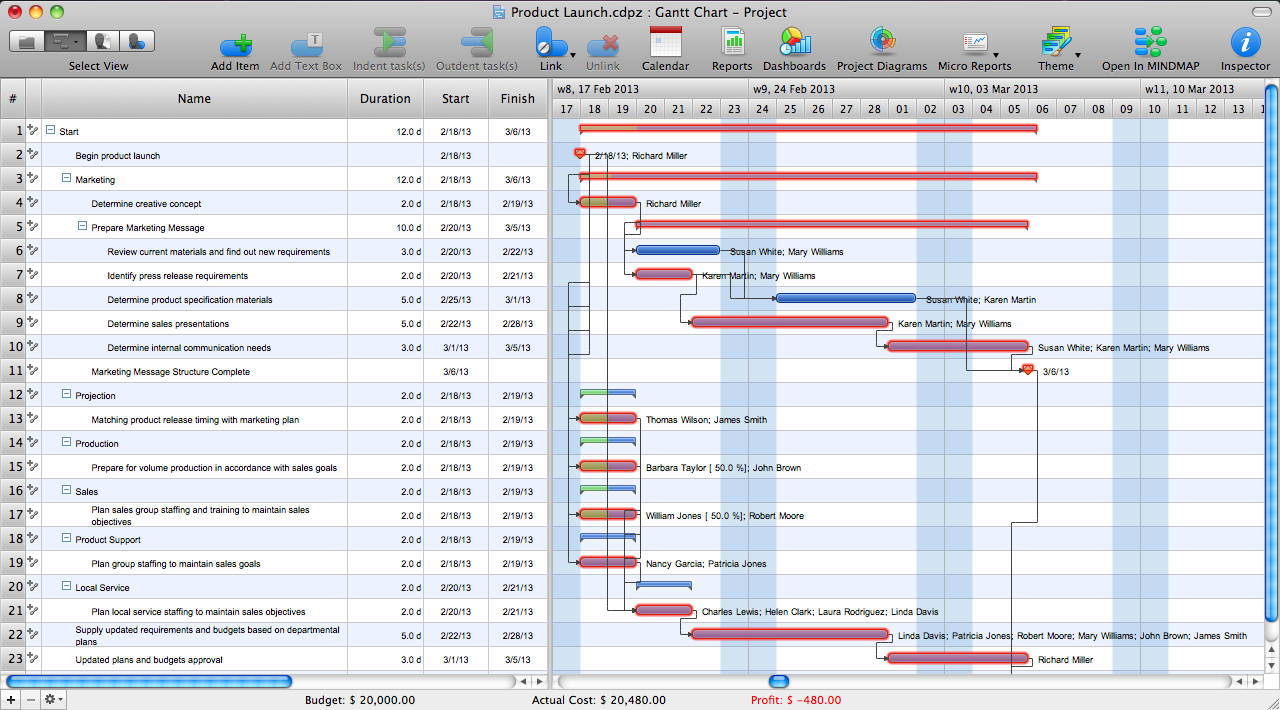
Why it's great for beginners (especially for planning):
- Visual Planning: Excellent for structuring projects, creating WBS, and mapping processes.
- Project Scheduling: Robust Gantt chart functionality for detailed scheduling.
- Concept to Completion: Bridges the gap between ideas and detailed project plans.
- Industry Solutions: Templates for various industries and project types.
Considerations: While excellent for planning and visualisation, it may require more familiarity than task-focused tools like Trello.
Ideal for: Project managers who rely on visual planning, engineers, consultants, educators.
Pricing: Perpetual license purchase, with free trials available.
Choosing the Right Tool for You
The "best" tool depends on your needs, budget, and team dynamics. Consider:
- What is your budget?
- How large is your team?
- What are your core needs: task tracking, communication, scheduling, or planning?
- What's your team's comfort level with software?
- What kind of projects do you manage?
Start with a free plan or trial, experiment with a few options, and see which one resonates best with your workflow.
Conclusion
Embracing project management tools is a pivotal step towards greater efficiency, successful project delivery, and reducing the stress often associated with project leadership. From the visual simplicity of Trello to the comprehensive power of Asana, Monday.com, and ClickUp, and the detailed planning capabilities of ConceptDraw, there's a tool out there perfectly suited for every beginner. By choosing wisely, you won't just save time; you'll build a solid foundation for managing projects like a seasoned pro. Happy managing!